Free Voice Recorder for PC Record your microphone, the sound playing on your computer, or both at once — then edit the take right away on Windows 11 and 10

Free Audio Editor records voice-overs, podcasts, online calls, streams and anything playing on your PC. The recording opens straight in the editor, ready to cut and clean.
Free for Windows 11 & 10 · Edit, record & save WAV free
Download Free Audio Editor

For Windows 11 & Windows 10 (64-bit)

Mic, PC sound or both — record and edit for free

Short answer: open Free Audio Editor, choose Tools > Record, pick your microphone, your PC sound, or both, and press record. The take opens in the editor, where you can cut it, remove noise and save it as WAV for free.
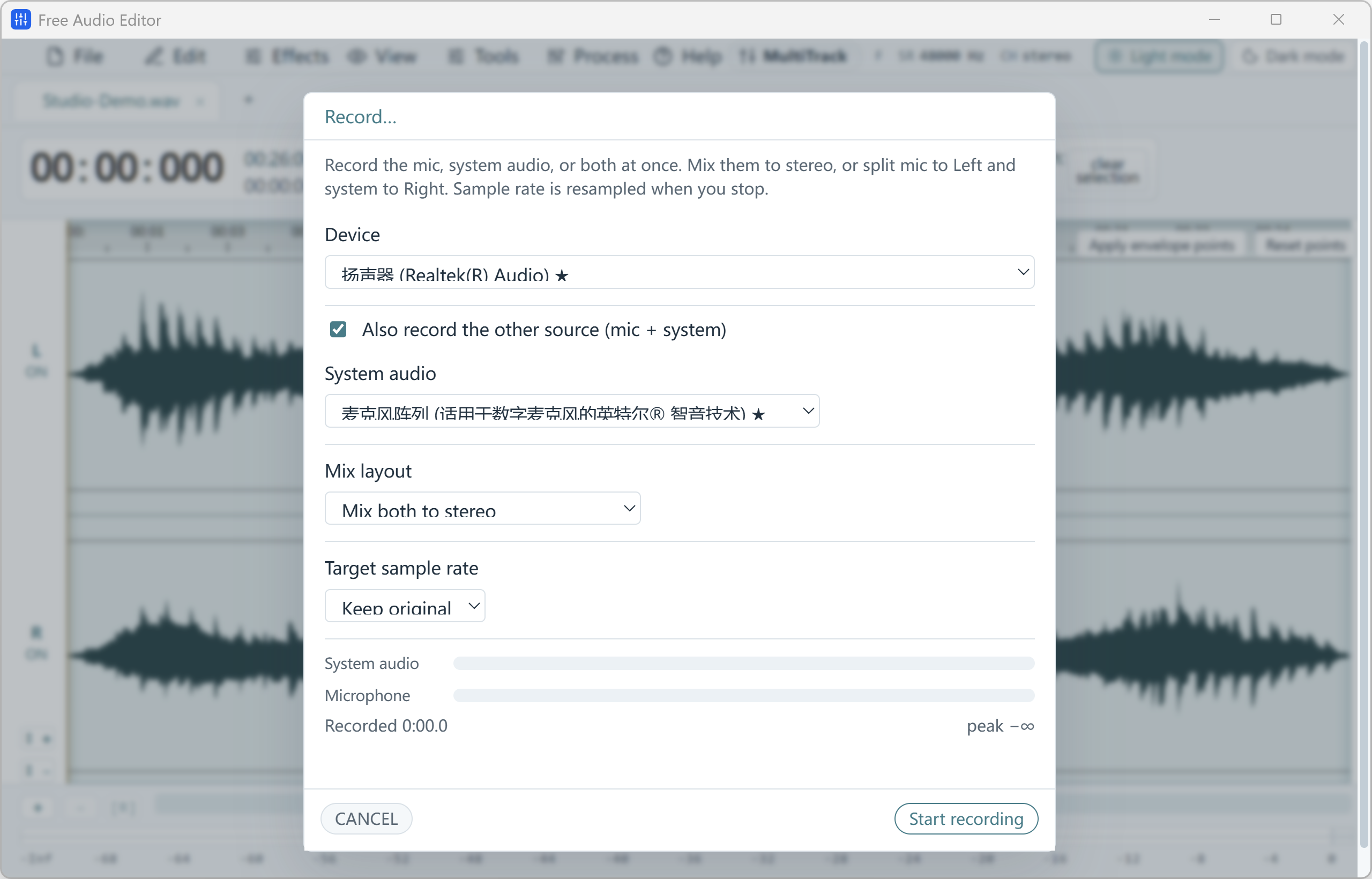
Free Audio Editor — Microphone and WASAPI system audio recording with source selection and level meters.
Microphone & System Audio Recording Original (2560 × 1640 px)

What You Can Record

  • Your microphone — voice-overs, podcasts, lessons and voice notes.
  • Your computer’s sound — online calls, streams and web audio, through WASAPI loopback.
  • Both at once — talk over a video or music that is already playing.
  • Separate channels — keep your voice on the left and the PC sound on the right for easier editing.
  • Punch-in recording — redo one sentence without recording everything again.
  • Up to 96 kHz — high-quality WAV recordings.

How to Do It in Free Audio Editor (Step by Step)

  1. Step 1: Open the recorder

    Choose Tools > Record in Free Audio Editor.

  2. Step 2: Pick the source

    Microphone, PC sound, or both. Choose stereo mix or separate left/right channels.

  3. Step 3: Record

    Press record, then stop when you are done. The take opens on the waveform.

  4. Step 4: Clean and save

    Cut mistakes, run Noise Reduction (Voice) if needed, and export WAV for free.

Record Responsibly

Tell people when you record a call, and only record streams or music you have the right to record.

What Is Free, and How to Get MP3 Free

Editing, recording, noise removal, effects, saving projects and exporting WAV are free in Free Audio Editor, with no watermark and no account. Saving directly to MP3, FLAC, AAC or other formats is part of the registered edition.

To stay 100% free, export WAV and convert it to MP3 with our free Free Video & Audio Converter. It converts whole folders at once, up to 320 kbps.

Try it on your own files

Free Audio Editor is free for Windows 11 & Windows 10. Install it in about a minute.

Download Free Audio Editor

Frequently Asked Questions

Is Free Audio Editor a free voice recorder?

Yes. Recording, editing and saving WAV are free with no time limit and no watermark. Convert to MP3 free with Free Video & Audio Converter, or save MP3 directly with the registered edition.

Can I record the sound playing on my computer?

Yes. Free Audio Editor records your Windows playback device (WASAPI loopback), your microphone, or both at the same time.

Can I keep my voice and the PC sound separate?

Yes. Mix both sources into one stereo track, or put your voice and the PC sound on separate left and right channels.

What if I make a mistake while recording?

Use punch-in recording to replace just that part instead of starting over.

What quality can it record?

Up to 96 kHz. The recording opens in the editor so you can cut, clean and save it right away.

Related guides: record system audio on Windows 11 · free voice editor · how to record audio.

Get Free Audio Editor

Free download for Windows 11 & Windows 10 (64-bit).

Download Free Audio Editor

Two Complete Windows Desktop Programs by FAEMedia

Waveform Editor & Voice Studio

Free Audio Editor

Precision stereo waveform & spectrogram editing, microphone + Windows system audio recording, and multi-stage voice cleanup.

  • Waveform & Multitrack: Cut, trim, crossfade, zero-crossing snap, seamless loops, markers, and multitrack mixer.
  • Repair Studio & Podcast Chain: De-click, de-hum, de-clip, de-ess, de-breath, voice noise reduction, 20-band EQ, compressor & LUFS loudness matching.
  • Edition Rights: Audio editing, project saving, and WAV export are free without registration. Registration (Upgrade) unlocks MP3, FLAC, ALAC, AAC, OGG, Opus, WMA & additional export formats.
All-In-One Video, Audio & YouTube Converter

Free Video & Audio Converter

Unifies Free Audio Converter, Free Video to Audio Converter, Easy Audio Extractor, Easy Video Switch, and Easy YouTube to MP3 Converter in one application.

  • 428 Built-in Presets: Convert video (MP4, MKV, MOV, AVI, HEVC, AV1), audio (MP3, FLAC, WAV, AAC, M4A, OGG, Opus, WMA) & device profiles.
  • Edit, Compress & Upscale: Trim, merge, crop, add subtitles or watermarks, target file-size compression, local AI upscaling & DVD/Blu-ray authoring.
  • YouTube Queue & Free Export: Read online video or playlist formats, add to queue, and convert. All supported conversion & export features are free.

Try It Online — or Get the Full Version Free

Our online tools are perfect for one short clip. For whole folders, full-length movies, YouTube playlists and noise removal, the free Windows programs are faster, aren't limited by browser memory, and keep your files on your PC.

Online Audio Editor

Short clip waveform preview in browser. Full recordings & Repair Studio in desktop app.

Online Audio Converter

Convert short WAV, M4A, FLAC, or OGG clips to MP3 in browser.

Online Video to Audio

Turn a short MP4, MOV, or WebM into MP3 in your tab.

Online Audio Extractor

Pull a short soundtrack segment with fade controls.

Online Video Converter

Convert a short video clip to MP4 or WebM in browser.