Short answer: install the free Free Video & Audio Converter on Windows, click YouTube / URL, paste each link or a playlist link, click Read formats, choose Audio only and add it to the queue. Pick MP3 (up to 320 kbps) and click Convert once to download and convert the whole queue.
Use it responsibly: download only videos you own, that are licensed for download, or that you have permission to save, and follow YouTube’s Terms of Service and copyright law.
How Batch YouTube to MP3 & Video Conversion Works in Free Video & Audio Converter
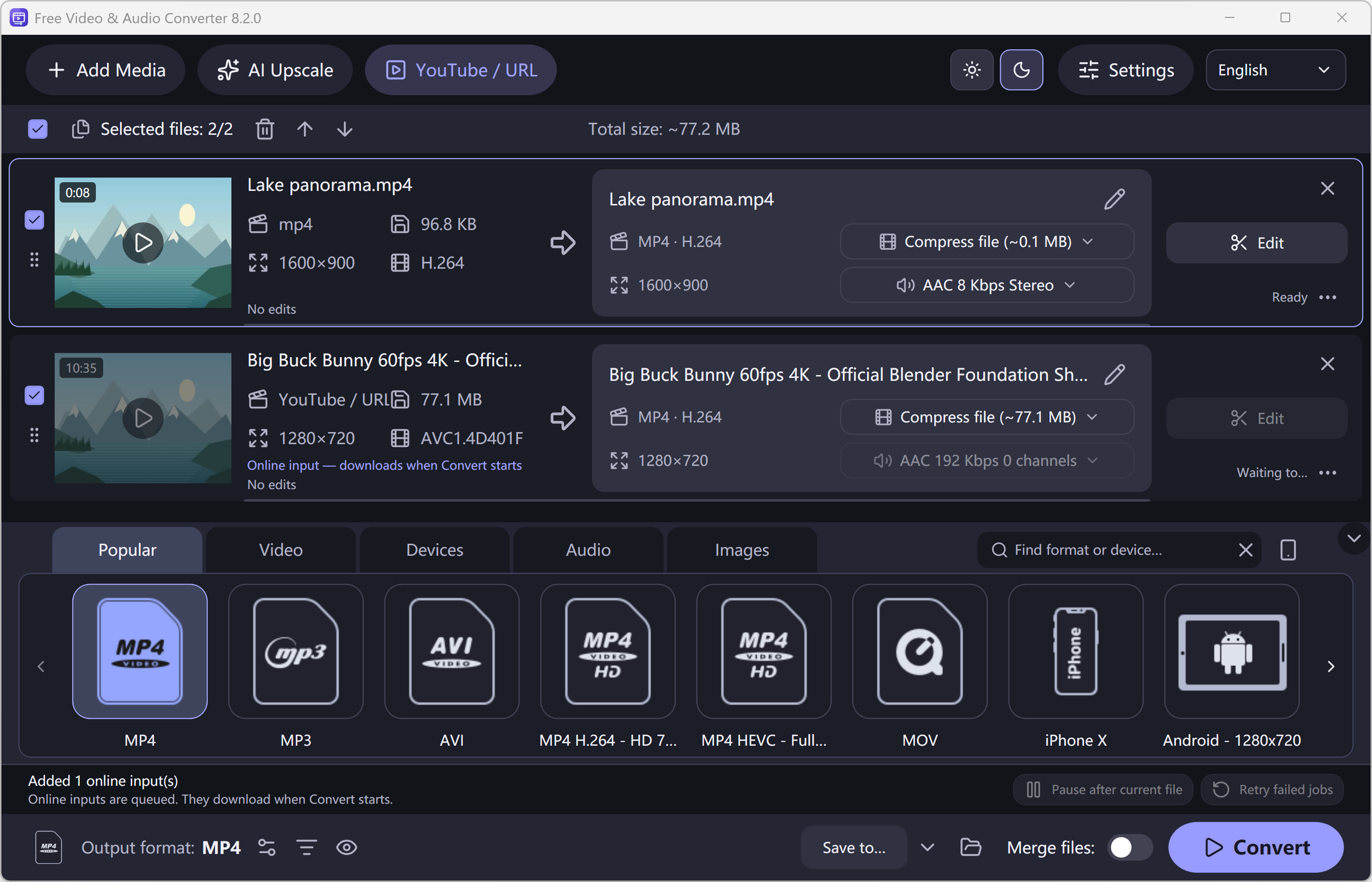
Easy YouTube to MP3 Converter is now unified into Free Video & Audio Converter. Instead of downloading files one by one in a browser tab, you can queue multiple online video links or an entire playlist (up to 100 items) and convert the entire queue in a single batch job.
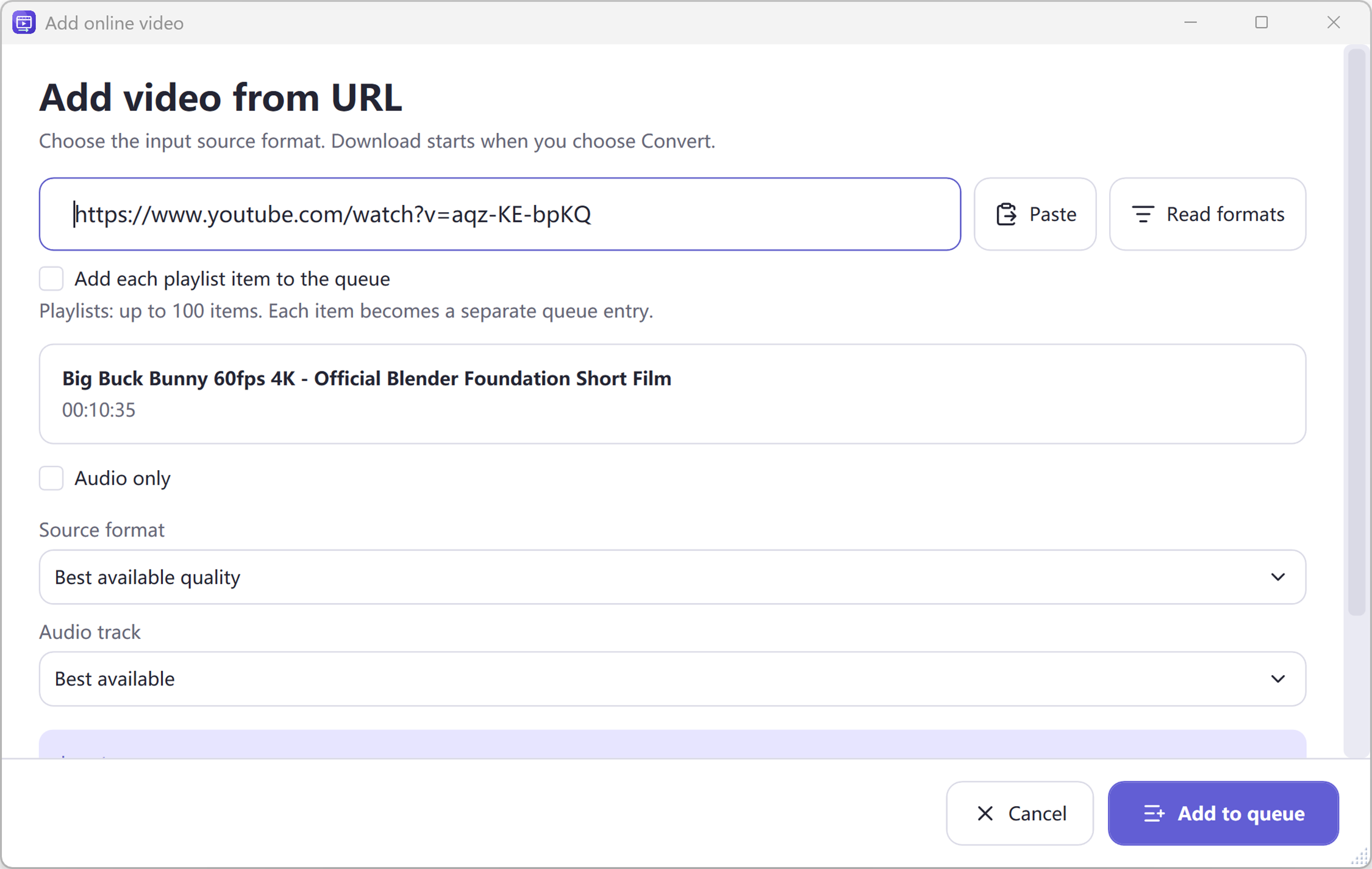
In Free Video & Audio Converter, online links work as input sources: you paste a supported public http(s) URL, click Read formats to inspect the video title, duration, and available video/audio streams, choose Best available quality, a specific resolution (up to 4K 2160p), or Audio only, and click Add to queue.
- Queue multiple individual YouTube URLs or playlists (up to 100 items per playlist) before starting the download.
- Choose Audio > MP3 (up to 320 kbps), M4A/AAC, FLAC, WAV, or OGG on the main converter window for music players.
- Or choose Video > MP4 (H.264 / HEVC) or Device profiles to save full video clips.
- Built-in yt-dlp module updater (manual check or startup check) keeps the download engine up to date with official SHA-256 verified Windows x64 nightly builds.
Separating Input Stream Selection from Final Output Format
A key improvement in Free Video & Audio Converter is separating the online source stream from your final converted output. When you select Audio only in the YouTube / URL dialog, the application selects the best available AAC/M4A source stream so it does not waste bandwidth downloading video frames. Then, when you select MP3 on the main screen and click Convert, it downloads that audio stream and encodes your final MP3 files automatically.
How to Do It in Free Video & Audio Converter (Step by Step)
-
Step 1: Click YouTube / URL & Paste Your Link
Open Free Video & Audio Converter, click the YouTube / URL button on the top toolbar, paste a supported video or playlist URL, and click the prominent Read formats button.
-
Step 2: Select Source Quality & Add to Queue
Choose Best available quality, a specific video resolution, or Audio only. For playlists, enable playlist mode (up to 100 items) so each video is added as its own queue row.
-
Step 3: Pick MP3 or MP4 & Click Convert
In the main converter window, choose Audio > MP3 (or Video > MP4) and click Convert. All queued online items download and convert in batch.
Frequently Asked Questions
How many playlist videos can I queue at once?
Playlist mode queues up to 100 items at a time. Each video’s quality rule is resolved against its own available streams rather than blindly reusing a stream ID from the first video.
What if a video URL fails to read formats?
Click the Check and update download module button in the error dialog (or under Settings) to update the bundled yt-dlp component, then click Retry. Note that private, member-only, age-restricted, or DRM-protected videos cannot be downloaded.
Is it free to convert YouTube to MP3 with it?
Yes. Free Video & Audio Converter is free. Every conversion, including MP3 up to 320 kbps, has no watermark and no time limit.
Does it work on my phone?
No. Free Video & Audio Converter is a Windows 11/10 program. Download it on a Windows PC.
Which playlists are not supported?
Private playlists and automatic YouTube mixes cannot be read. Deleted, private or region-blocked videos inside a playlist are skipped.