Open the browser editor with a short clip on your device. The Delay effect lets you choose when the repeat arrives, how long it carries on and how much of it you hear under the original. Work on files up to 12 MB and four minutes long.
Select the sound and leave room for the repeats
Open the browser editor. From File, choose Load from Computer, or drag a local audio file onto the waveform. Play the clip and find a word, clap or instrument hit followed by a gap.
Drag across that sound and some of the quiet space after it. Apply Delay to this selection and the next line can stay dry. If you select only the word and stop at its final syllable, the repeats can cut off at the edge.
Choose a starting echo and preview it
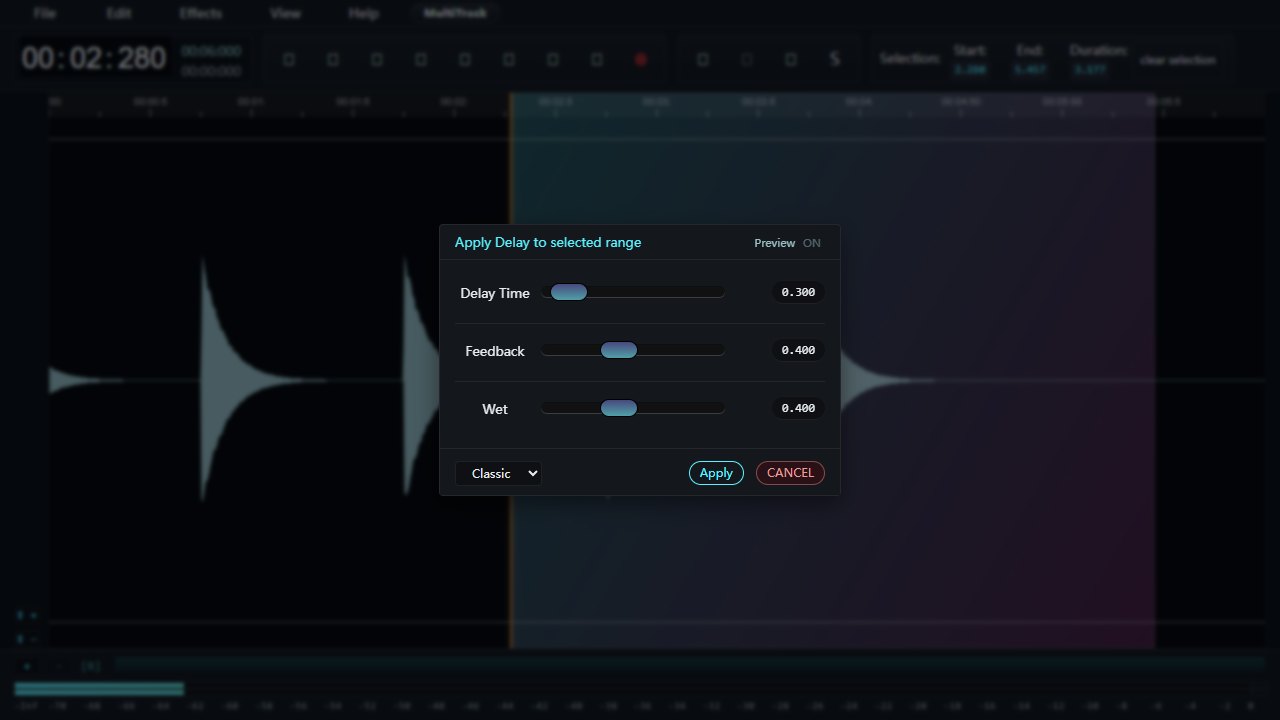
Open Effects and choose Delay. Pick Classic in the presets menu and press Preview. The starting settings are 0.30 seconds for Delay Time, 0.40 for Feedback and 0.40 for Wet. Listen for the second hit or syllable in the gap.
Press Preview again to stop listening. If you open Delay without first selecting a region, the editor selects the whole clip.
Make the words and the echo easy to hear
- Delay Time sets the gap between the original and the repeat. Raise it to hear a distinct answer after a word. Shorten it when the repeat lands on the next beat or syllable.
- Feedback feeds some of the echo back into the delay. Lower it for a repeat that dies away quickly. Increase it gradually when the sound has plenty of empty space after it.
- Wet sets the amount of effect in the mix. If two voices seem to compete, bring Wet down and preview again at the same speaker volume.
Once the timing feels right, choose Apply. Play from just before the selection through the next word so you can judge the transition in context.
Save the edited clip
Choose File and then Export / Download. Choose Export whole file to retain the surrounding audio, or Export Selection Only for the chosen phrase and its repeats. Choose your format, give the edit a different file name and press Export.
Listen to the downloaded file before closing the tab. If the echo ends too abruptly, undo the effect and give the selected range a little more quiet space at its end. If the repeat covers the next words, first reduce Feedback.